
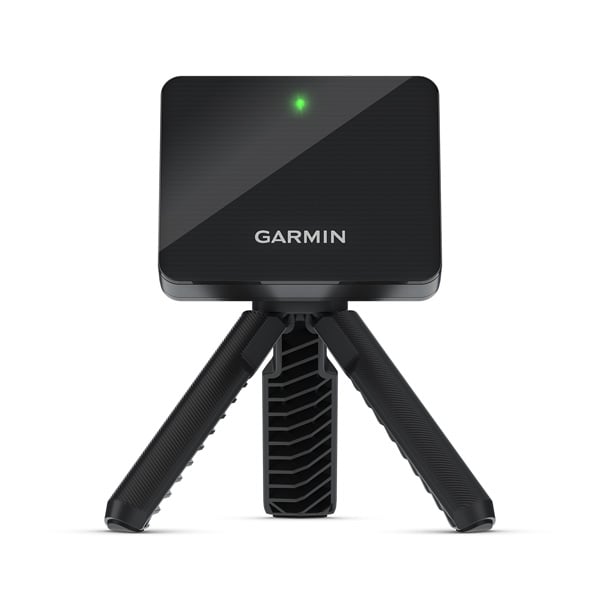
The best golf simulator for home use is the one that fits your swing, your room and the device you already own. Start with the Garmin Approach R10 if you have enough depth and want a portable practice setup. Try the SKYTRAK ST MAX if you need a side-positioned monitor and want an upgrade path to course play. Consider the Uneekor EYE MINI LITE if you have a dedicated indoor bay and a compatible Windows PC.
Each pick is the device at the center of a setup. You still need a suitable hitting surface and a way to stop the ball. Measure before you order a screen, enclosure or projector. A wider screen has little value if it moves your tee into the path of a garage door rail.
As an Amazon Associate I earn from qualifying purchases.
Three home golf simulator setups compared
| Launch monitor | Where it sits | Good first build | Check before buying |
|---|---|---|---|
| Garmin Approach R10 | 6–8 ft behind the ball, with at least 8 ft from ball to screen or net | Net, hitting mat and compatible phone or tablet | Clear depth, radar placement and features included with the app |
| SKYTRAK ST MAX | Beside the hitting area | Mat and net or screen with compatible display device | Hitting area, left/right switching and membership for desired course play |
| Uneekor EYE MINI LITE | Beside the hitting area, wired to a compatible Windows PC | Dedicated bay with mat, enclosure and PC | PC requirements, wired connections and software plan |
The room must still let each player swing the longest club they plan to hit. Dimensions for the monitor and screen describe different pieces of the build. Measure from the hitting surface, since a raised mat takes away ceiling clearance.
Garmin Approach R10 — For a portable setup with enough depth

The R10 is a practical choice if you plan to practice indoors and also want to take the device to the range. Garmin’s setup guidance calls for the monitor 6–8 feet behind the ball and at least 8 feet from the ball to the screen or net. Lay out those points with tape. Leave additional space for whatever clearance the net or screen maker requires behind it.
Start with the range and shot tracking in the Garmin Golf app, then decide whether you want the course features or other software. Verify device and plan compatibility before buying an annual membership. A simple phone or tablet display can be enough for a few swings after work.
Pros: Portable and suited to a staged build. Its rear position can make switching between left- and right-handed players easier if both can use the same tee safely.
Trade-offs: It needs room behind the ball and a clear ball-to-net distance. Check Garmin’s guidance on indoor interference and placement before committing to a garage or basement.
SKYTRAK ST MAX — For a side-positioned monitor

Start with this model if you have room for your swing and impact setup but can’t spare the radar space behind the tee. The ST MAX sits near the ball. Put its position in the floor plan, including access to charge it and room for the protective case if you buy one.
SKYTRAK offers practice and course-play features through different plans. Check whether the device you’ll use supports the specific mode you want. The manufacturer says its current course-play support differs from basic app support, so don’t assume that a phone that runs the range will run every course. If both hands share the bay, account for moving and realigning the monitor when needed.
Pros: Side placement can solve a room-depth constraint. The maker offers ball and club data and a path from range work to course play.
Trade-offs: Paid features and display requirements can add cost. The tee area and monitor position still need to suit your mat and both hands.
Uneekor EYE MINI LITE — For a dedicated Windows bay

The EYE MINI LITE is designed for indoor use with a wired setup. It’s a better fit when the computer and monitor can stay in place between sessions. Plan the power and data cable route before putting down the mat. Keep cords out of the swing area and where people walk.
Check Uneekor’s current Windows and graphics requirements for the exact software you want. If you already have a desktop, compare its specs against the vendor’s list before ordering. Confirm what the included plan does and which membership or license applies to third-party simulation.
Pros: Indoor-focused layout for a permanent practice station. No need to buy a rear-radar-length room simply to place the monitor.
Trade-offs: The Windows PC and wired setup are part of the purchase decision. A side-positioned device can slow down changeovers when players hit from opposite sides.
Plan the bay around the shot you’ll actually hit
Measure the player, then the equipment
Mark the tee, screen and standing area. Include the width behind the player’s body and the backswing area. Check low points such as lights, rails and a ceiling fan. Never try a full-speed swing in an unverified space. If the room only suits irons or wedges, price the practice bay on that basis. A full-course package won’t create the clearance to hit driver.
If someone taller or a golfer of the other hand will use it, put both hitting positions on the drawing. The left-handed tee may sit near a wall or outside the monitor’s useful hitting area. A shared room may benefit from a net and removable mat while you work out the best permanent position.
Choose the display after you decide how you’ll use the bay
For distance practice, a nearby tablet or monitor can work. Put it outside the ball path. Add a projected screen if playing virtual rounds is a big reason to buy and the room supports the projector mount and throw distance. Check where the picture falls while you stand at the ball. A shadow across the target gets old quickly.
Price the screen and enclosure as a system. An impact screen, its frame and the protection around it serve different purposes. A monitor that’s a good value on its own may cost more to integrate once the room and computer are counted. Use the home golf simulator cost guide to build a first-year quote.
Use data you can put to work
Start with carry for the clubs you use most often. Run a set with the same ball and save your normal strikes. Review the distance gaps before changing a club. Our pitching wedge loft guide shows why the difference between a PW and the next wedge matters more than either number in isolation.
If you mainly want to compare launch monitors, see the launch monitor buying guide. If driver practice matters, use the driver loft guide to structure a comparison with the same ball and strike location.
Check the setup you will use most often
A bay that shares space with a parked car needs a different plan from a dedicated room. Count what you have to move before you can hit a ball and where each piece goes afterward. A quick practice session is more likely to happen if the mat and display take a few minutes to set up.
For a permanent bay, ask the seller for frame dimensions and the usable screen area. Check what sits behind and beside the screen and how much clearance the manufacturer requires. A package photo can show a computer, projector or stand that is optional. Ask the seller to identify what is included in writing.
Plan a session before you add software
If your main goal is carry, run a repeatable session with three clubs and a normal target distance for each. Save the shots you commonly hit and look for a gap that needs work. A practice range and a way to review your shots may be enough for that job.
If your main goal is virtual rounds, check your favorite course and play mode before buying. Verify whether both work on your planned device and which membership unlocks them. Add the renewal price to the quote even if the initial bundle includes a trial.
Decide when you’ll know the bay is ready
Try the shortest and longest clubs your room can safely accommodate. Check whether the monitor reads both and whether the ball containment works with the layout. Then switch to the other hand if a regular guest needs it. Record setup time and cable placement before mounting anything permanently.
FAQ
What is the best home golf simulator for a beginner?
Start with a monitor, proper mat and net if your room meets the requirements and you mainly want practice. A projection setup can come later. Confirm that the basic software does what you want before buying extras.
What is the best golf simulator for home use in a small room?
A side-positioned monitor can reduce the room needed behind the ball. You still need room for the golfer, hitting surface and impact setup. Get the clear dimensions and compare them with the exact monitor and screen documentation.
Can a home simulator work without a projector?
Yes. A net and a compatible tablet or computer can be enough to practice. Check that the app you want runs on your device and that the net is rated for the clubs and balls you’ll use.
Should I buy a bundle or separate pieces?
A bundle makes sense if every piece fits your room and you’ll use it. Get an itemized list and check what’s included. Separate pieces can be a better fit if you already own a suitable display or have an unusual room.
Leave a Reply